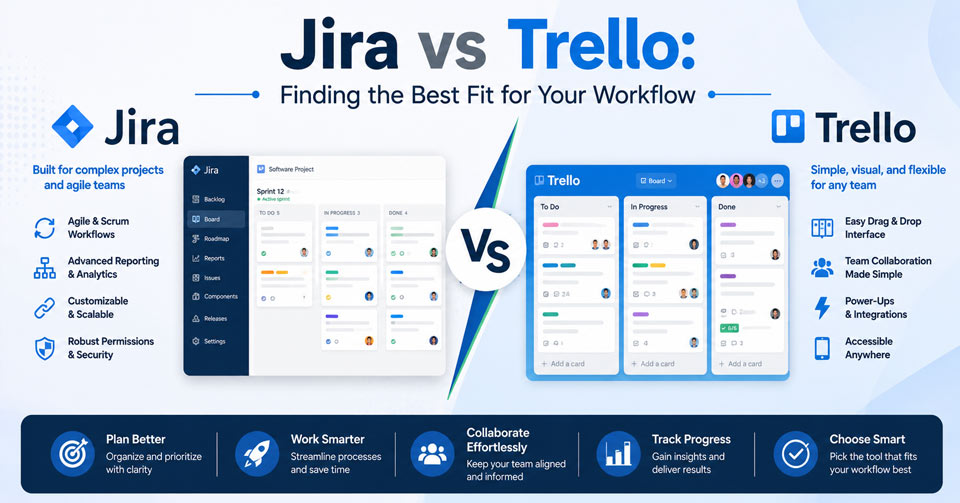
The Jira vs Trello choice depends on how your team manages projects. Jira offers advanced workflows, planning tools, and project visibility for complex work. Trello focuses on simplicity, helping teams organize tasks through intuitive visual boards. The right option depends on whether your team values advanced control or straightforward task management.
What Is Jira Software?
Jira is built to help teams organize work, manage priorities, and keep projects on track. It provides a centralized space for assigning tasks, tracking completion, and monitoring progress. The platform also includes native support for Scrum and Kanban frameworks.
Core Concepts
Issues
Every piece of work in Jira starts with an issue. Each issue tracks a single task or request. Teams also use issues to manage bugs and feature development.
Epics
An epic helps you manage large projects without losing track of individual tasks. It brings related tasks together, helping teams manage progress more efficiently.
Backlogs
The backlog acts as a holding area for planned work. Teams can sort tasks and prepare them before moving them into active projects.
Sprints
A sprint is a time boxed period for completing planned work. Teams commit to a set of tasks and review their progress before the next sprint begins.
Key Features
Issue Tracking and Task Management
- Custom Issue Types: Organize work with issue types designed for different tasks and workflows.
- Detailed Fields: Capture important task information with customizable fields and attributes.
- Comments and Mentions: Keep conversations connected to tasks and notify the right team members.
Agile Boards and Views
- Scrum Boards: Organize sprint activities with dedicated boards for planning and execution.
- Kanban Boards: See project progress at a glance by moving tasks through each workflow stage.
- Timeline and Roadmaps: Map project goals and dependencies with a clear visual timeline.
- List View: View and update project tasks in a simple list format.
Workflows and Automation
- Custom Workflows: Build workflows that match your team’s unique project process.
- No Code Automation: Automate everyday project tasks to improve workflow efficiency.
- Approval Gates: Add approval steps before work moves to the next stage.
Reporting and Analytics
- Burndown and Burnup Charts: Monitor sprint progress and track remaining project work.
- Velocity Charts: Measure sprint performance to improve future planning.
- Custom Dashboards: Display key project metrics with customizable dashboard widgets.
Integrations and Security
- Developer Tools: Connect Jira with development tools such as Bitbucket, GitHub, Jenkins, and Azure DevOps for a streamlined workflow.
- App Marketplace: Extend Jira with thousands of apps and integrations.
- Permissions: Protect project data with flexible access and permission controls.
Who Should Use Jira?
Some project management tools focus on simplicity. Jira focuses on structure. If your projects include several contributors, changing priorities, and connected tasks, Jira keeps everything organized without losing visibility.
Jira is a strong choice if your team needs:
- Sprint planning
- Dependency tracking
- Workload management
- Performance reporting
What Is Trello?
Trello makes project management simple with an easy to understand visual layout. Tasks move across boards as work moves forward, giving everyone a clear view of progress. Moreover, built in tools help teams assign work and stay on schedule.
Core Concepts
Boards
Boards provide a dedicated workspace for managing projects. They keep related tasks, team members, and project information organized in one place.
Lists
Lists break projects into clear workflow stages instead of one long task list. Teams quickly see what is active and what comes next.
Cards
Cards keep all task details in one place for easier collaboration. Team members can share updates, files, and feedback directly within each card.
Checklists
Checklists organize subtasks within each card. They help teams monitor progress and stay on schedule.
Key Features
Collaboration and Tracking
- Due Dates: Set task deadlines to keep work organized and projects on schedule.
- Assignees: Assign cards to team members, making task ownership clear for everyone.
- Attachments: Store files and documents with each task for easy access.
- Activity Log: View a complete history of task updates, comments, and board activity.
Productivity and Customization
- Butler Automation: Automate repetitive actions with rule based workflows without coding.
- Power Ups: Extend Trello with apps, integrations, and additional project views.
- Labels and Filters: Organize cards by category or priority and quickly find relevant work.
- Views: Change project views to match your planning, scheduling, or tracking needs.
Who Should Use Trello?
If your team prefers visual organization over detailed configuration, Trello offers an easy way to manage projects. It keeps work moving without adding unnecessary complexity.
It is a strong choice if your team needs:
- Visual task management
- Simple workflow tracking
- Team collaboration
- Flexible project organization
Jira vs Trello: Project Management Software Comparison
Here is a quick comparison of Jira vs Trello across key features, capabilities, and use cases.
| Feature | Jira | Trello |
| Best For | Agile teams, software development, and complex projects | Individuals, small teams, and visual project management |
| Ease of Use | Steeper learning curve | Beginner friendly and easy to learn |
| Project Complexity | Best for complex workflows | Best for simple to medium complexity projects |
| Task Management | Advanced issue tracking and task management | Visual card based task management |
| Workflow Management | Highly customizable workflows | Simple Kanban style workflows |
| Agile Support | Native Scrum and Kanban support | Kanban focused with basic agile support |
| Sprint Planning | Yes | Limited, requires Power Ups or manual setup |
| Roadmaps | Built in timelines and roadmaps | Timeline view available on eligible plans |
| Automation | Advanced no code automation | Butler automation for routine tasks |
| Reporting | Burndown, velocity, dashboards, and analytics | Basic reporting with activity tracking |
| Integrations | Extensive marketplace and developer integrations | Wide range of Power Ups and integrations |
| Permissions | Granular project and user permissions | Simpler permission controls |
| Customization | Extensive customization options | Lightweight customization |
| Mobile Experience | Full featured mobile app | Simple and intuitive mobile app |
| Pricing | Free plan available with paid tiers | Free plan available with paid tiers |
Pros and Cons of Jira vs Trello for Project Management Teams
Here’s a closer look at the strengths and limitations of each platform to help you determine the best fit for your team.
Jira
Pros
- Simplifies sprint planning and project tracking with built in Scrum and Kanban tools.
- Adapts to your team’s process through customizable workflows and issue types.
- Provides clear project insights through dashboards, reports, and performance metrics.
- Connects with development tools and business apps through extensive integrations.
- Supports growing teams and complex projects as your organization scales.
Cons
- New users often need time to understand the platform and its features.
- Small teams with straightforward workflows may find Jira unnecessarily complex.
- Large projects and detailed issue histories make navigation feel overwhelming.
- Advanced financial planning and portfolio management often require additional apps.
Trello
Pros
- Offers a simple visual layout that helps teams start organizing work quickly with minimal setup.
- Lets teams customize boards, labels, and task structures for different workflows.
- Includes core task management features, unlimited cards, and basic automation in its free plan.
- Connects with popular apps and tools to extend project management capabilities.
Cons
- Lacks built in advanced features for needs like time tracking, dependency management, and detailed scheduling.
- Requires Power Ups or third party tools for more advanced reporting and planning features.
- Becomes harder to manage when handling complex projects across multiple teams and workflows.
- Provides limited reporting and analytics without additional tools or upgrades.
Conclusion
Choosing between Jira vs Trello comes down to your team’s priorities. Jira offers the structure needed for complex projects, while Trello focuses on straightforward task organization. If you need advanced reporting and customization, Jira is the stronger option. If ease of use and flexibility matter most, Trello is a practical choice.
Frequently Asked Questions
Is Trello included with Jira?
No, Trello is not included with Jira. Both tools are owned by Atlassian but operate as separate project management platforms. Jira focuses on advanced workflows, agile development, and issue tracking, while Trello uses a simpler visual board system for organizing tasks.
Who is Jira’s biggest competitor?
Jira faces competition from several project management platforms, including Trello, Asana, Monday.com, and ClickUp. The biggest competitor depends on the use case. Trello competes with Jira for simpler task management needs, while platforms like Asana and ClickUp compete with Jira across broader project management workflows.
Jira vs Trello vs Asana: Which project management tool is better?
Jira, Trello, and Asana serve different types of teams. Jira works best for software development teams managing complex workflows. Trello is ideal for simple visual task tracking and collaboration. Asana offers a balance between structured project management and ease of use, making it suitable for teams managing multiple projects.
Trello vs Jira for personal use: Which one is better?
Trello is usually the better choice for personal use because it offers a simple visual system for managing tasks, goals, and daily plans. Jira is designed more for structured team workflows, agile projects, and detailed issue tracking, which makes it less practical for individual task management.
What is the best free project management software for teams?
The best free project management software depends on your team’s needs. Trello offers an easy way to organize tasks with visual boards, while Jira provides free access to agile tools for smaller teams. Other options like Asana and ClickUp also offer free plans with task management features for teams.