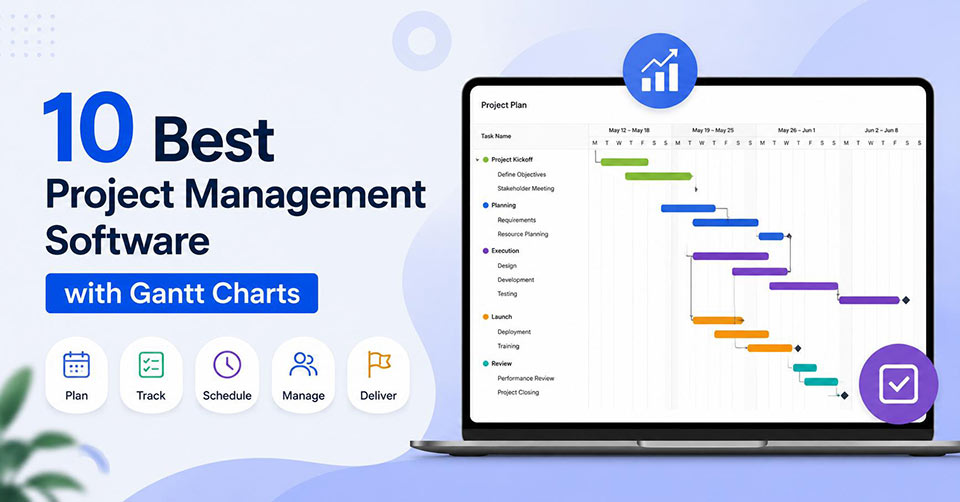
Managing projects without a clear timeline can quickly lead to missed deadlines, resource conflicts, and communication gaps. That’s why Gantt charts remain one of the most valuable project management features for businesses of all sizes. They provide a visual timeline that helps teams plan tasks, assign responsibilities, track dependencies, and monitor project progress from start to finish.
Today, many project management platforms include advanced Gantt chart functionality alongside collaboration tools, automation, reporting, and resource management. Whether you’re managing software development, marketing campaigns, construction projects, or client work, choosing the right solution can significantly improve productivity.
Why Gantt Charts Are Important to Project Management
Gantt charts convert project schedules that are complicated to comprehend into visually understandable timetables. The project manager is able to quickly determine how tasks are connected and whether deadlines will be met.
The following are some of the most important benefits:
- Effective project planning and scheduling
- Identification of task dependencies
- Good workload balancing
- Easy progress monitoring
- Good team collaboration
- Accurate deadline prediction
Top Project Management Software with Gantt Charts
The following project management platforms offer robust Gantt chart capabilities alongside features such as task management, workflow automation, resource planning, and team collaboration, making them suitable for businesses of different sizes and industries.
1. Advanced Work Management for Scaling Teams
Asana presents the Timeline feature that provides an easy way to schedule and track work within multiple projects. Gantt charts make it possible to visualize deadlines, task dependencies, and project progress without complicating the experience for newcomers.
Features include:
- Interactive Gantt charts
- Dependencies between tasks
- Workflow automation
- Time tracking
- Collaboration with the team
Best for: Small and scaling teams and agencies
2. Spreadsheet Tool with Gantt Charts
Companies that appreciate the structure of the workflow use Smartsheet, which is known for combining spreadsheet functionality with Gantt charts capabilities. Besides, the platform is good at providing enterprise-level reporting and resource management.
Features include:
- Gantt charts with dependencies
- Resource management
- Workflow automation
- Enterprise reporting
- Portfolio management
Best for: Large companies and enterprise teams.
3. Flexibility in Managing Tasks and Timelines
If customization is one of your main goals, then ClickUp can provide you with interactive Gantt charts along with different views of projects and collaboration options built in.
Key features:
- Interactive Gantt charts
- Different views of projects
- Workflow automation
- Integrated Docs
- Whiteboards
Best for: Startups, remote workers, and growing businesses.
4. Advanced Planning and Management of Enterprises
The most popular tool among large organizations is Microsoft Project because it has advanced scheduling options and interactive Gantt charts that are great for managing dependencies and resources.
Key features:
- Advanced scheduling
- Resource management
- Portfolio management
- Milestones planning
- Reporting
Best for: Enterprise project management.
5. Visual Planning That Is Simple but Effective
If you are looking for a simple platform to plan your projects, monday.com is equipped with colorful Gantt charts, automation options, and different ways to view your projects.
Features:
- Visual Gantt charts
- Automation options
- Different project views
- Collaboration tools
- Workload management
Best for: Marketing, operations, and creative teams.
6. Agile Projects With Visual Timelines
Agile project managers often use Jira to handle their Agile projects while making use of roadmaps and Gantt chart planning.
Features:
- Roadmap feature
- Sprint planning
- Dependencies mapping
- Custom workflows
- Reporting dashboards
Best for: Agile and software development teams.
7. Comprehensive Business Platform
When integrating document storage along with project management needs, companies often look at Notion that comes with timeline view in addition to databases, notes and collaboration spaces.
Features:
- Timeline view
- Collaborative documents
- Databases Templates
- Custom workflows
Best for: Multi-departmental teams and knowledge management.
8. Professional Services Project Management
Agencies and consultancy firms require Teamwork which integrates Gantt charts along with resource management and time tracking features.
Features:
- Gantt charts
- Time tracking
- Resource management
- Client management
- Budget management
Best for: Agencies and professional services.
9. Advanced Work and Resource Management
Multidivisional companies frequently choose Wrike because of its advanced Gantt charts, workload balancing, and reporting options.
Features include:
- Interactive Gantt charts
- Workload management
- Request forms
- Automation Reporting
Best for: Medium and large-size businesses.
10. Affordable Project Scheduling
Developing companies can choose Zoho Projects to make project schedules, track milestones, and manage task dependencies without paying the price tag of enterprise-level software.
Features include:
- Gantt charts
- Milestone tracking
- Task dependencies
- Collaboration options
- Time tracking
Best for: Freelancers, start-ups, and small businesses.
Industries Where Gantt Chart Software is Most Useful
Gantt chart software finds extensive use in different industries where projects consist of multiple activities, deadlines, and participants. Construction companies and engineering firms use it for managing the various stages of their projects, whereas IT companies and software developers need Gantt chart software for managing their product roadmap and releases. Marketing firms, health care facilities, consulting firms, and other professional service organizations will find it useful too. It does not matter what kind of industry a business belongs to; if they have complex workflows, Gantt chart software will prove useful.
Conclusion
Good project management software with Gantt charts allows the team to plan their timeline, organize their tasks and resources, and keep the project on track throughout the whole process. Whatever kind of a project it may be; whether it is an enterprise-wide initiative, an Agile project, a client-oriented project or even regular tasks for the team; good project management software can help you to increase the transparency, simplify the cooperation and avoid scheduling conflicts.
While choosing project management software, pay attention to such aspects as usability, scalability, automation abilities, reporting possibilities, and integration options. The good software should not only fit the current project management process of your team, but it should also meet the future needs of your company.
Frequently Asked Questions
What is project management software with Gantt charts?
It is project management software that includes visual timeline tools for planning tasks, scheduling work, tracking dependencies, and monitoring project progress throughout the project lifecycle.
Who should use Gantt chart-based project management tools?
Project managers, marketing teams, software developers, construction firms, consultants, agencies, and businesses managing multiple projects can all benefit from Gantt chart functionality.
Are Gantt charts suitable for Agile teams?
Yes. Many modern project management platforms combine Agile boards, sprint planning, roadmaps, and Gantt charts, allowing teams to manage both traditional and Agile workflows.
Can small businesses benefit from Gantt charts?
Absolutely. Gantt charts help small businesses organize projects, improve team collaboration, avoid scheduling conflicts, and complete work more efficiently without requiring enterprise-level resources.