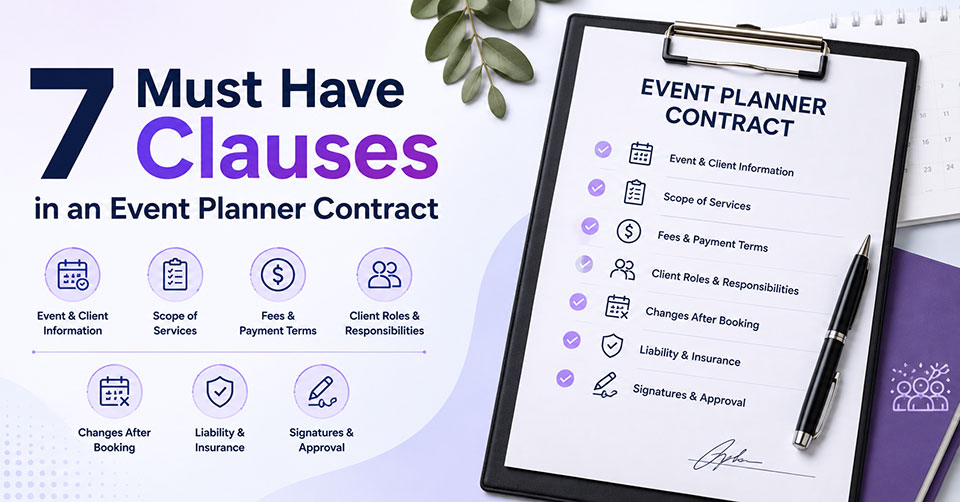
A well written event planner contract sets clear expectations from the beginning. It outlines your services, payment terms, and each party’s responsibilities throughout the planning process. Clear contract terms help prevent misunderstandings before they become bigger problems. Event planning software adds another layer of organization by keeping contracts, updates, and records easy to manage.
What Is an Event Planner Contract?
An event planner contract helps both parties by defining the responsibilities, expectations, and terms of the event. It covers:
- Event details, dates, locations, and schedules
- Scope of services and planning responsibilities
- Payment terms, fees, and deposit requirements
- Cancellation and refund policies
- Client expectations and approval processes
- Vendor coordination and third party responsibilities
- Changes, revisions, and additional service requests
- Liability terms and other legal protections
- Communication methods and project updates
- Ownership of event materials or creative assets
7 Essential Elements of an Event Planner Contract
A complete event planner contract should cover these seven key elements to protect both parties and keep every event on track:
1. Event and Client Information
Every event planner contract starts with basic details about the client, planner, and event. This section establishes who is involved and what the agreement covers.
- Includes legal names, business details, contact information, and communication details for both parties.
- Covers the event date, timing, venue location, and other key event information.
2. Scope of Services
This section details the services the planner will deliver and sets clear guidelines for the agreed work.
- Outlines services such as vendor management, event design, coordination, and on site support.
- Highlights excluded services to set clear boundaries and prevent misunderstandings during the planning process.
3. Fees and Payment Terms
A contract should clearly explain the financial side of the planning agreement, including costs and payment requirements.
- Covers total service fees, deposits, retainers, payment schedules, and final balance deadlines.
- Establishes guidelines for extra charges, expense recovery, and fees applied to late payments.
4. Client Roles and Responsibilities
Outlines client duties, including required details, approvals, and cooperation needed for successful event planning.
- Specifies timelines for guest list submissions, feedback, document sharing, and other necessary client actions.
- Clarifies approval schedules for planning elements to keep decisions timely and the project on track.
5. Changes After Booking
This element explains how cancellations, date changes, and unexpected situations affect the agreement.
- Covers retained fees, refunds, cancellation terms, and payment obligations after cancellation.
- Includes rescheduling conditions and protections for events affected by emergencies or uncontrollable circumstances.
6. Liability and Insurance Clauses
Liability terms define responsibilities and protections when issues occur during planning or event execution.
- Includes limits on damages and financial responsibility for different situations.
- Covers protection from vendor issues, guest incidents, and other third party concerns.
7. Signatures and Contract Approval
A contract requires proper approval to become a valid agreement between the planner and client.
- Includes signed names, dates, and authorization from all involved parties.
- Provides a final record of the agreed terms, services, and responsibilities.
How Event Planning Software Simplifies Contract Management
Event management tools such as iVvy Venue & Event Management Software and Pxier Sales and Catering help teams manage contracts, client interactions, and event information through a connected system.
One Place for Every Agreement
Event management software makes it easier to manage contracts and related documents. Your team can view client and vendor agreements, track updates, and keep records organized in one system. Platforms such as iVvy Venue & Event Management Software, Pxier Sales and Catering, Tripleseat, Artifax Event, and Cvent centralize contracts, client records, vendor agreements, and event documentation. This keeps important files organized and easy to access.
Faster Online Signing
Digital signatures simplify approvals for clients and vendors. Everyone signs agreements online without printing, scanning, or mailing paperwork. Goodshuffle Pro and Perfect Venue support digital proposals, contract terms, electronic signatures, and approval workflows, helping teams complete agreements faster.
Ready to Use Contract Templates
Simplify agreement creation by using reusable templates for common event details. Event management software reduces manual work by organizing key information into standardized documents. Platforms such as Goodshuffle Pro and Perfect Venue provide built in templates that make creating proposals and agreements faster and more consistent.
Automated Deadline Reminders
Reminder tools help track important deadlines, including payments, deposits, and cancellation terms. Your team gets notifications at the right time, making follow-ups easier and keeping planning tasks on schedule.
Financial and Invoice Integration
Keep financial details organized by connecting signed contracts with billing and accounting tools. Goodshuffle Pro and Perfect Venue help manage proposals, payments, invoices, and deposits while giving your team better visibility into outstanding balances.
5 Event Management Software Features That Support Better Contracts
Managing event contracts becomes easier with software. The right features help you handle approvals, track changes, and keep important agreement details in one place.
1. Dynamic Contract Templates
Reusable templates help you create consistent agreements without starting from scratch each time.
- Access pre-approved clause libraries for various events, such as corporate gatherings, weddings, and venue bookings.
- Add standard terms quickly while keeping contracts accurate and consistent.
- Reduce time spent creating agreements for similar projects.
2. Proposal to Contract Sync
Connecting proposals with contracts helps turn approved details into finalized agreements faster.
- Transfer accepted estimates, services, and pricing details into contracts automatically.
- Reduce manual data entry and avoid errors between proposals and agreements.
- Keep project details aligned from approval to execution.
3. Digital Signature Management
Online signature tools help clients and vendors complete contract approvals with less effort.
- Allow clients to sign agreements from mobile devices or computers.
- Record signing dates, timestamps, and approval history.
- Keep completed contracts stored with related event information.
4. Milestone Based Invoicing
Payment tracking becomes easier when billing schedules are linked to contract milestones.
- Create deposit requests based on signed agreement terms.
- Track upcoming payments and scheduled invoices.
- Keep payment records connected to each event contract.
5. Version Control and Document Tracking
Tracking contract activity helps prevent confusion during revisions and approvals.
- Record document interactions, from initial views to final signatures.
- Keep a record of previous contract versions.
- Reduce disputes caused by unclear changes or outdated agreements.
Conclusion
Strong contract management starts with clear agreements and defined responsibilities. Event management software like iVvy Venue & Event Management Software, Tripleseat, and Perfect Venue helps your team organize contracts, track payment details, and manage updates in one place. A smoother workflow supports better communication and more successful event outcomes.
Frequently Asked Questions
What is a contract in event management?
An event management contract is a written agreement between an event planner and client. It defines services, payment terms, responsibilities, timelines, cancellation rules, and other conditions for managing the event.
What are the 7 stages for event planning?
The seven stages include setting goals, creating a budget, selecting a venue, planning details, coordinating vendors, executing the event, and reviewing results after completion.
How to write a contract for an event?
Define event details, services, fees, payment terms, responsibilities, cancellation policies, timelines, and approval requirements in the contract. Have all parties review and sign the agreement before any work begins.
What is free event planning software for event contracts?
Free event planning software for event contracts includes tools with basic contract creation, templates, document storage, and workflow features. Options vary, so check available features before selecting a platform.
What is the best event planning software for event contracts?
The best event planning software depends on your needs. Tools like iVvy Venue & Event Management Software, Tripleseat, Goodshuffle Pro, and Perfect Venue support contract workflows, signatures, and event management tasks.